
Today, links to six super-useful free tools:
1. One of the secrets to writing great copy is making it REALLY easy to read. 7th grade reading level or lower = good copy. College level = BAD copy. Bad. (Always!) Most of Gary Halbert’s classic letters read at the 4th to 5th grade level. That’s why they’re so “primal,” and so persuasive.
Paste your text into http://www.addedbytes.com/tools/readability-score/ and you’ll see what grade level your text is.
The Flesch-Kincaid Grade Level grade level of this blog post is 4.5. 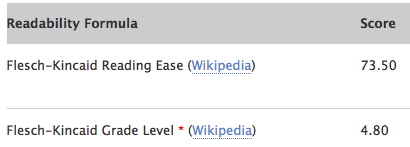
2. FormatIT – I format my emails 60-65 characters wide. Makes them easier to read. www.formatit.com does this for you while leaving long URL’s intact. There’s also a “Re-FormatIT” option that removes carriage returns and unwanted characters.
3. Google’s Wonder Wheel visually represents the way Google’s search engine perceives the relationships between keywords. You only have to play with it for 30 seconds to get the idea. It also illustrates how Google’s bot initially chooses sites for ads in the Content Network.
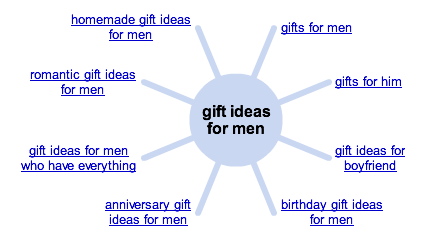 To use it: Go to google.com, do a search and click on “Show Options.” Down a few inches on the right side you’ll find a link called “Wonder Wheel.”
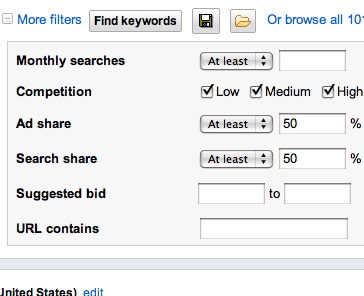
4. Google’s keyword based search tool – Seldom talked about but allows you to sift and sort keywords according to all kinds of advanced criteria like bid price, level of competition, ad share, search share, and competitor. www.google.com/sktool
 5. Need to send a 100 megabyte audio or video file? YouSendIt is great for sending huge files without using email attachments. YouSendIt.com.
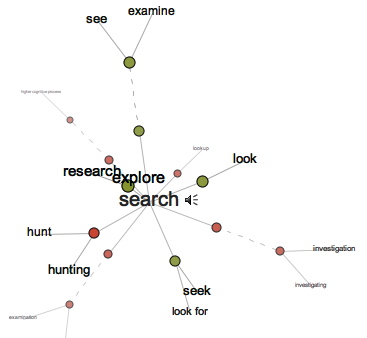
6. Visual Thesaurus – I don’t know about you, but for me, thesauruses seldom give me the exact word I’m looking for. VisualThesaurus.com, however, is a graphical tool that’s a lot like Google’s Wonder Wheel. You can chase strings of words and relationships. The paid version is only $20 per year – CHEAP. www.VisualThesaurus.com
Share This Post
About the Author

Perry Marshall has launched two revolutions in sales and marketing. In Pay-Per-Click advertising, he pioneered best practices and wrote the world's best selling book on Google advertising. And he's driven the 80/20 Principle deeper than any other author, creating a new movement in business.
He is referenced across the Internet and by Harvard Business Review, The New York Times, INC and Forbes Magazine.
20 Comments on “6 Free Online Tools I love”
You might also like Power Thesaurus (powerthesaurus.org) – it’s a fast, comprehensive and easy-to-follow online thesaurus.
I think GWheel is not a concurent for visual thesaurus. This is a fact. However number 5 is the only tool I didn’t test.
Numbers 3 and 5 are already in my personal of useful tools. Will test other 4. Thanks!
The first sentence really caught my attention i.e. making it REALLY easy to read. Simplicity is still the best way to go. I concur with it. This is a common misunderstanding that putting too much details and enhancing articles with bombastic words will impress readers, but the reality is the opposite. Thats where street smart people wins in what we call practical marketing.
Please with th recommended tools. Good write up.
Thanks.
Regards,
Dr.Maria Sesmilo (AFP)
YouSendIt was absolutely the only thing that got me a very big account a couple of months ago. I had to send a huge file by 5pm, and at 430pm I realized my email wouldn’t handle the size.
This listing of 6 free online tools is a good compilation. It would take a layman years to come up with this listing.
Thanks a lot for the recommendations.
Regards,
Dr Alexander
Perry, great set of tools! http://www.addedbytes.com/ is a treasure. I found cheat sheets I will use. One tool I am still looking for: I read somewhere that you have a click through calculator. Where do I find it?
http://www.splittester.com
Hi Perry – I loved this post, I use most of the tools you mentioned, and love them. I just wanted to let you know I took Bobsled this time last year and my business grew by 5x this year. Much of this I attribute to the knowledge I got at Bobsled. Happy Holidays to you and your family!
All the best,
Kris
CEO / Founder
Child Care Marketing Solutions
Kris,
Congratulations and keep the hammer down! Stories like yours make my day :^>
Perry
Great post. Luckily English is my second language and I write at 4-7 grade level automatically. I always thought that my English skills placed me at a disadvantage as compared to native English speakers but the more I learn about copywriting the more I realize that I have a huge advantage with my simple English written skills. Of course there is more to copywriting than that.
Perry,
I read that you love the tool that makes the line brakes in your emails.
That might be ok for normal screens, but let me tell you, it sucks on the iphone (where I usually read your mails). Looks terrible.
BUT: I think your mails are great (aside of the fact that they are difficult to read because of the line breaks ;-)
Regards,
Mark
How does one down grade their writing?
I would like a tool that would do just that.
Make the sentences shorter. Active voice, not passive. Smaller words. Imagine that you’re writing to 7th graders. Sounds kind of elementary, but it works!
hey Perry…
excellent timing… I’ve been searching for something to format my emails…
Perry,
Thank you for the “6 online tools” post. Some really good stuff there. I only wish other experts would post useful information like this instead of the constant barrage of “buy this” messages.
only a small percentage of the world’s population actually reads books, most people don’t and many people are illiterate!
Great list of tools here Perry!
I have been using the Wonder Wheel and the Google Sktool for quite a while and they work great.
However, the first tool you mentioned will really, really help me because I am a bad copywriter.
Also, I want to thank you for mentioning that Visual Thesaurus tool. I have bookmarked the regular thesaurus, but I think I am going to adopt this new one.
Thanks a bunch!
Tommie
Just want to say this is a great post. These tools are all great and very useful.
I personally like Send Space (http://sendspace.com/) for sending large files. The file size limit is 300 megs and they never make you sign up for an account.
The Google keyword tool is great but I don’t think it compares to the Wordtracker keyword research tool.
Thanks again for the great post.
I’ve used YouSendIt and it works great. Another tool I use is the Spartan Multi-Clipboard. You can copy and paste up to 25 clips, and it hovers on top of your desktop. I don’t have the url right now, just google either “Spartan multi clipboard” or “M8 multi-clipboard”. Thanks for this very useful post, Perry, you’re The Man.